Biggest Ulefone Armor 29 Pro Rugged Phone Buying Mistakes (And How to Avoid Them)
Introduction
Rugged smartphones, once niche tools designed only for specialized fields, have become popular among outdoor enthusiasts, industrial workers, and anyone seeking a durable alternative to fragile flagships. One of the standouts in this category is the Ulefone Armor 29 Pro Rugged Phone. However, as this phone gains attention for its robust build and impressive feature set, many potential buyers make avoidable mistakes that lead to disappointment or buyer’s remorse.
This in-depth guide dissects the most common pitfalls when purchasing the Ulefone Armor 29 Pro, empowering readers to make the smartest buying decision. Whether you’re a hiker, a field engineer, or someone who wants a worry-free device, understanding the nuances of this phone—and what to avoid—can save time, money, and frustration.
Detailed Review: Ulefone Armor 29 Pro Rugged Phone
Design and Durability
The Ulefone Armor 29 Pro is designed with endurance at its core. With IP68/IP69K dust and water resistance and MIL-STD-810H certification, it can withstand drops, dips, dust storms, and temperature extremes. Real-world reports show frequent use by construction professionals, extreme sports athletes, and campers who expose their devices to harsh conditions daily.
Display
It features a 6.58-inch FHD+ display, providing a balance between size and clarity. The Gorilla Glass protection is effective against scratches, but the large bezels and increased weight—necessary for reinforcing durability—mean that users coming from slim consumer phones may need an adjustment period.
Hardware and Performance
Powered by a MediaTek Helio G99 chipset, the Armor 29 Pro is not aimed at gamers or power users but delivers smooth performance for everyday tasks, multitasking, GPS navigation, and running specialized field apps. The 8GB RAM plus 256GB ROM helps with app switching and media storage, while expansion via microSD is ideal for fieldwork photologs and offline maps.
Battery Life
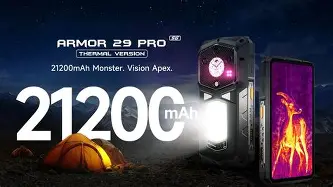
A 10,600 mAh battery is one of the phone’s defining features. In typical use, the battery easily lasts two to three days—even with heavy GPS or media usage—a major asset for those in remote locations without easy charging access.
Cameras
The 64MP main camera, supported by a night vision module, caters to users who require documentation on the go—think construction progress photos, campsite documentation, or accident site reports. However, the camera processing is not on par with mainstream flagships. Daylight photos are solid, but low-light conditions reveal focusing limitations and some grain.
Connectivity and Features
Dual-SIM support, global LTE bands, NFC, and robust satellite navigation (GPS/GLONASS/BeiDou/Galileo) make this phone versatile for travelers and professionals. The custom push-to-talk button and integrated toolkit apps (compass, barometer, noise test, etc.) represent real value for users in challenging scenarios.
Pros and Cons of Ulefone Armor 29 Pro
- Pros:
- Exceptional durability with IP68/IP69K and MIL-STD-810H certification
- Ultra-large battery (10,600mAh) delivers 2-3 days of real-world use per charge
- Useful field tools (night vision camera, toolkit apps, powerful flashlight)
- Dual SIM and global LTE band support for international travelers
- Expandable storage (MicroSD up to 2TB)
- Customizable hardware buttons for field tasks (push-to-talk, emergency apps)
- Competitive pricing compared to mainstream rugged devices
- Cons:
- Bulkier and heavier than standard smartphones
- Camera performance weaker than flagship devices, especially in low light
- No 5G support—limited to 4G LTE
- MediaTek G99 is mid-tier; not ideal for heavy gaming or advanced photo editing
- Wireless charging not present
- UI may include excessive pre-installed apps (bloatware)
- Android OS updates may be less frequent than major OEMs
Common Buying Mistakes to Avoid
1. Overestimating Camera Capabilities
Many buyers expect flagship-level photos from a rugged phone at this price point. While the Armor 29 Pro’s camera is solid for documentation and occasional snapshots, it lacks the processing power and sensor size of mainstream flagships. Night vision offers unique capabilities, but daytime clarity and video stabilization are middling. If professional-quality photography is essential, a dedicated camera or a hybrid dual-device solution is advisable.
Discover deals on Laptops & Computers — updated daily.
View Offers →2. Ignoring Phone Weight and Ergonomics
With a battery this massive and a reinforced chassis, the Armor 29 Pro is noticeably heavier and bulkier than regular phones. Average weight is around 400 grams. This is great for withstanding falls, but the size and weight may be uncomfortable for users with smaller hands or those expecting a slim daily driver. Buyers should handle a similarly sized device if possible, or at minimum verify published dimensions to ensure comfort for their intended use cases.
3. Assuming Flagship-Level Software Support
Rugged phone brands often update slower than major manufacturers. Expect fewer Android version upgrades and sporadic security patches. For business deployments that require long-term OS support, consider this tradeoff carefully and research Ulefone’s update patterns before purchasing.
4. Not Checking LTE Band Compatibility
Despite its global LTE band support, always cross-check the supported frequency bands with your specific carrier—especially if you’re outside China or Europe. Some U.S., Canadian, or niche regional carriers may lack full compatibility for the best data speeds or VoLTE features.
5. Skipping Warranty and Service Considerations
While the phone is built to survive, heavy field use can still lead to issues. Investigate warranty details and local service options before buying, particularly if you order from third-party sellers. Some buyers report lengthy return processes or difficulty sourcing spare parts.
6. Focusing Only on Battery Size
Massive battery life is a highlight, but charging times are notably long due to the large capacity and lack of wireless charging. USB-C fast charging is available, but hours are needed for a full recharge. Buyers upgrading from smaller phones should adjust expectations regarding overnight charging and bring appropriately rated power banks or solar charging options for off-grid scenarios.
7. Overlooking Software and Bloatware
The Armor 29 Pro’s interface includes several pre-installed utility apps. While many are practical for fieldwork, some users find them redundant or cluttered. Be prepared to disable or uninstall apps you don’t need, and familiarize yourself with privacy settings.
Ulefone Armor 29 Pro vs. the Competition
How does the Armor 29 Pro stack up against other popular rugged smartphones? Here’s a comparison against common alternatives like the Doogee S100 Pro and Blackview BV8900:
| Feature | Ulefone Armor 29 Pro | Doogee S100 Pro | Blackview BV8900 |
|---|---|---|---|
| Certification | IP68/IP69K, MIL-STD-810H | IP68/IP69K, MIL-STD-810G | IP68/IP69K, MIL-STD-810H |
| Display | 6.58" FHD+ (Gorilla Glass) | 6.58" FHD+ | 6.5" FHD+ |
| Battery | 10,600mAh | 10,800mAh | 10,000mAh |
| Camera (Main) | 64MP + Night Vision | 108MP + Night Vision | 64MP + Night Vision |
| Performance | MediaTek Helio G99 (8GB RAM) | MediaTek Helio G99 (12GB RAM) | MediaTek Helio P90 (8GB RAM) |
| Storage | 256GB (+MicroSD) | 256GB (+MicroSD) | 256GB (+MicroSD) |
| Wireless Charging | No | Yes | Yes |
| Weight | ~400g | ~430g | ~398g |
| 5G | No | No | No |
| Price Range | Mid | Mid-High | Mid |
| OS Updates | Irregular (Android 13) | Irregular (Android 13/14) | Irregular (Android 13) |
Buying Guide: How To Choose the Right Rugged Phone (and Avoid Mistakes)
1. Define Your Priorities
- Work Demands: Construction, engineering, adventure sports, or industrial jobs put unique stress on devices. Prioritize certification and battery.
- Travel Needs: If you travel internationally or to remote regions, focus on LTE compatibility and GPS performance.
- Documentation: If photo quality is crucial, consider dual-device setups or be prepared for the Ulefone’s photo limitations.
2. Read Real-World User Reports
Rugged phone forums, industrial blogs, and user review sites are your friends. Look for repeated complaints—charging port wear, screen response in gloves, or navigation performance in dense forests. Actual field-user feedback is more illuminating than promotional specs.
Shop the latest Laptops & Computers picks on Amazon.
Shop Amazon →3. Weigh the Pros and Cons Objectively
No phone is perfect. If durability and battery are top concerns, a slightly heavy device may be easy to adapt to. If software and camera innovation are more important, a rugged phone will always require compromise. Avoid buyers' regret by ranking your must-haves.
4. Confirm Carrier and Regional Compatibility
Not every phone sold online will work perfectly with every carrier, especially in the Americas. Request band compatibility sheets from Ulefone or your retailer, and confirm with your carrier’s tech support before finalizing your purchase.
5. Ask About Service and Support
A rugged phone is an investment. Check if there’s official or third-party support in your region. Some users purchase additional warranty or insurance policies, which can pay off for field users.
6. Stay Up To Date on Software Expectations
Subscribe to user forums or resources that monitor Android updates for your device. Custom ROM communities may offer alternatives if official updates are slow or discontinued.
7. Test Ergonomics If Possible
If you’re new to rugged phones, handle one at a local shop, or borrow from a colleague before you buy. First impressions matter; don’t let size and heft catch you by surprise.
Conclusion
The Ulefone Armor 29 Pro excels in durability, battery life, and field-ready features, reflecting significant advances in rugged smartphone design. However, buyers who overlook software quirks, camera trade-offs, or after-sales concerns may find themselves dissatisfied.
By knowing and avoiding the most common mistakes—from overestimating features to underpreparing for support needs—prospective buyers can enjoy a rugged device that fulfills its promise: dependable performance in the toughest environments. A little research, realistic expectations, and clear priorities will ensure the Armor 29 Pro is a rugged companion, not a regret.