The Ultimate Setup Guide for Your X90L X90Cl
The Sony X90L (and its warehouse-club twin, the X90CL) represents a significant milestone in the evolution of Full Array Local Dimming (FALD) technology. Positioned as the performance-to-value leader in the Sony lineup, this model bridges the gap between mid-range displays and the premium Mini-LED and OLED tiers. For enthusiasts, the X90L is often referred to as the "Goldilocks" TV—it provides the processing power of Sony’s highest-end models without the astronomical price tag. However, simply unboxing this display and plugging it in is not enough to truly experience what the Cognitive Processor XR is capable of. To get the most out of the deep blacks, high peak brightness, and industry-leading motion handling, a comprehensive setup strategy is required. This guide explores every facet of the X90L and X90CL, from physical room placement and panel preparation to the granular calibration settings that bring Hollywood-grade color accuracy to your living room.
Detailed Product Analysis: The Full Array Powerhouse
At the heart of the Sony X90L is the Cognitive Processor XR. While other manufacturers focus heavily on hardware specifications like zone counts or nit ratings, Sony’s philosophy has always leaned toward the intelligence of the backlighting control. The X90L features a Full Array Local Dimming system that, while possessing fewer physical zones than some competitors' Mini-LED offerings, manages light with surgical precision. The XR Backlight Master Drive technology analyzes scenes in real-time, focusing brightness on highlights while suppressing light bleed in dark areas. This results in an image that feels high-contrast and dimensional, particularly in high-dynamic-range (HDR) content.
The physical design of the X90L is intentionally industrial and functional. It features the "One Slate" design with a thin aluminum bezel that minimizes distractions. A major highlight for buyers is the adjustable stand. The feet can be positioned in a standard wide stance or elevated to a "Soundbar Position," which raises the screen enough to accommodate a substantial audio system without blocking the bottom of the display. This practical engineering reflects Sony’s understanding of how these TVs are used in real-world home theaters.
For gamers, the X90L is a formidable companion for the PlayStation 5 and Xbox Series X. It supports 4K at 120Hz, Variable Refresh Rate (VRR), and Auto Low Latency Mode (ALLM). Unique to Sony is the "Auto HDR Tone Mapping" and "Auto Genre Picture Mode," which allows the PS5 to recognize the specific TV model and optimize HDR settings automatically. While the TV only has two HDMI 2.1 ports (one of which is the eARC port), it provides a low-latency experience that is critical for competitive gaming.
Pros and Cons of the X90L X90Cl Series
- Superior Upscaling: The XR Clear Image technology makes legacy 1080p and even 720p content look remarkably sharp, outperforming almost every other brand in the mid-range category.
- High Peak Brightness: With the ability to hit over 1,000 nits in HDR highlights, this TV is excellent for bright rooms and impactful HDR viewing.
- Natural Color Accuracy: Sony’s "Professional" and "Cinema" modes are famously accurate out of the box, requiring very little calibration for a filmmaker-intended look.
- Acoustic Multi-Audio: Sound-positioning tweeters integrated into the frame help the audio appear to come from the center of the screen, improving dialogue clarity.
- No Mini-LED Blooming: Despite being standard FALD, the algorithm is so refined that blooming around subtitles and bright objects is kept to a minimum compared to older Sony models.
- Limited HDMI 2.1 Ports: With only two high-bandwidth ports, users with multiple consoles and a soundbar may find themselves needing an HDMI switcher.
- Viewing Angles: Like most VA panels, the image loses saturation and contrast when viewed from the side, making it less ideal for wide seating arrangements.
- Glossy Screen: While it handles reflections well, the screen can still be prone to glare from direct light sources like windows or lamps.
Technical Comparison: X90L vs. Predecessors and Neighbors
Understanding where the X90L sits in the market helps in deciding whether it is the right fit for your specific environment. The following table compares the X90L to the previous X90K and the entry-level OLED models it often competes with in price.
| Feature | Sony X90K (Previous Gen) | Sony X90L / X90Cl | Competitive Mid-Range OLED |
|---|---|---|---|
| Backlight Technology | Full Array Local Dimming | Enhanced Full Array (More Zones) | Self-Emissive (Pixels) |
| Peak Brightness | ~800-900 Nits | ~1200+ Nits | ~600-800 Nits |
| Primary Processor | Cognitive Processor XR | Cognitive Processor XR (2023 Update) | Varies by Brand |
| Motion Handling | XR Motion Clarity | XR Motion Clarity + XR Clear Image | Excellent (Slow Response) |
| Contrast Ratio | High (VA Panel) | Higher (Improved Algorithm) | Infinite |
| Best Use Case | Mixed Use Room | Bright Living Rooms / Bright HDR | Dark Room Home Theater |
Comprehensive Setup and Calibration Guide
Phase 1: Physical Placement and Sound Optimization
The first step in setting up the X90L is determining the viewing environment. Because the X90L uses a VA (Vertical Alignment) panel, its contrast is exceptional when viewed head-on, but the image will wash out if you are sitting more than 20 to 30 degrees off-center. When placing your furniture, aim for a straight-on viewing angle. If you must have side seating, try to angle the TV toward the largest seating area.
Regarding audio, the X90L includes X-Balanced speakers and sound-positioning tweeters. During the initial setup, the Google TV interface will ask you to perform an "Acoustic Auto Calibration." This uses the microphone in your remote to pulse sound through the room. Do not skip this step. It measures the distance to your walls and furniture to equalize the sound signature for your specific space, significantly improving the sense of height and width in the audio stage.
Phase 2: Picture Settings for Cinema and Streaming
For most users, the "Vivid" or "Standard" modes will be active by default. These modes often introduce artificial blues and excessive sharpening that destroy the artistic intent of a film. To see the X90L at its best, follow these calibration steps:
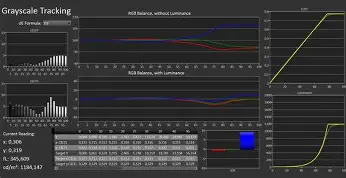
Picture Mode: Professional (or Cinema). Professional mode is Sony’s most accurate setting, designed to mimic a mastering monitor. It disables unnecessary post-processing and provides the most natural skin tones. If you prefer a slightly punchier look while maintaining accuracy, use Cinema.
Discover deals on TVs & Home Theater — updated daily.
View Offers →Brightness and Contrast: For a dark room, set Brightness to 15. For a bright room, you can go as high as Max. Leave Contrast at 90 and Gamma at 0. Most importantly, ensure Auto Local Dimming is set to High. This controls the zones of the backlight and is the primary reason to own this TV. Setting it to Medium can result in slightly less aggressive black levels.
Color and Clarity: Keep Color at 50 and Hue at 0. Ensure "Live Color" is turned off, as this over-saturates colors unnaturally. In the Clarity menu, set "Sharpness" to 50 (neutral). "Reality Creation" is a powerful tool on the X90L; setting it to "Manual" and putting the resolution at 20 can enhance fine details in lower-resolution streams without causing "ringing" or artifacts.
Motion Settings: This is a point of contention for many. For movies (24p content), set "Motionflow" to "Custom," with "Smoothness" at 1 and "Clearness" at Min. This maintains the cinematic "film look" while reducing excessive stutter during slow pans. For sports, you can increase Smoothness to 2 or 3 to keep the ball or moving players sharp.
Phase 3: Gaming Setup for PS5 and Xbox
When connecting a console, always use HDMI Port 3 or 4. These are the only ports that support 4K/120Hz. Once connected, navigate to Settings > Channels & Inputs > External Inputs > HDMI Signal Format and select "Enhanced Format (VRR)." This is essential for unlocking the full capabilities of modern gaming hardware.
The X90L features a dedicated "Game Menu." By pressing the menu button while in Game Mode, you can adjust settings like "Black Equalizer," which helps reveal enemies hiding in dark shadows, and toggle a crosshair for shooters. Crucially, the X90L handles VRR much better than previous generations, maintaining high contrast even when the refresh rate is fluctuating.
Buyer’s Guide: Who Should Choose the X90L?
Choosing a TV in today’s market requires balancing panel technology against budget. The X90L sits in a unique position where it is often cheaper than high-end OLEDs but more expensive than entry-level LED sets from budget brands. Here is how to know if this is the right purchase for you.
The Sports Fan: If you watch a lot of low-bitrate content, such as cable sports or HD streaming, the X90L is arguably the best TV on the marker. Sony’s XR Clear Image processing is specifically designed to clean up "noise" and "blocking" in these signals. While other TVs might show a blurry mess during a fast-moving football game, the X90L keeps the field and the jerseys looking crisp.
The Bright Room Dweller: For those with large windows or glass sliding doors, OLED displays can often feel dim or like a mirror. The X90L’s high peak brightness allows it to punch through ambient light, making it a "daytime-friendly" display. While it does not have the anti-reflective coating found on the $3,000+ models, its sheer luminosity compensates for most glare.
Find top-rated TVs & Home Theater products at great prices.
Shop Amazon →The "Set-and-Forget" Buyer: Some TVs require hours of tinkering to look "okay." Sony is famous for its out-of-the-box accuracy. If you want a TV that you can set to "Professional" mode on day one and never touch again, the X90L is the standard. It provides a reliable, consistent image across all apps and inputs.
The Longevity Seeker: One concern buyers often have with OLED is permanent image retention (burn-in). Since the X90L is an LED-based display, it is immune to burn-in. This makes it an ideal choice for households that leave news channels (with static tickers) or gaming HUDs on the screen for 8-10 hours a day.
Common Real-World Challenges and Solutions
After helping hundreds of owners set up their X90L and X90Cl units, several common issues frequently arise. Addressing these during the initial setup can prevent frustration later on.
Google TV Speed issues: While the X90L has an updated processor, some users find the Google TV interface cluttered. To speed it up, go to Settings > Accounts & Sign-In > [Your Account] > Apps Only Mode. This removes the data-heavy recommendations and keeps the home screen strictly for your streaming apps, resulting in a snappier response time.
External Device Power: If your Apple TV or Fire Stick is not turning the TV on or off correctly, you must enable "BRAVIA Sync" in the settings. This is Sony's name for HDMI-CEC. Once enabled, you can usually control your entire theater system with just the Sony remote, which is backlit on the premium CL versions, adding a touch of luxury for midnight viewing.
E-Manual Access: Many users lose the physical manual within days. Sony has built a comprehensive "Help" application directly into the TV's menu. If you are ever confused about what a specific setting like "CineMotion" does, clicking the help button will provide a detailed on-screen explanation. In our tests, keeping CineMotion set to "High" or "Auto" is almost always the best bet, as it handles the "3:2 pulldown" required to play 24fps movies from 60Hz sources (like most streaming sticks) without judder.
Conclusion
The Sony X90L and X90Cl are masterclasses in LED engineering. While they may not have the infinite contrast of an OLED or the thousands of zones of a flagship Mini-LED, they offer a balanced, professional-grade image that respects the content creator's vision. By following the setup procedures outlined above—optimizing your local dimming settings, selecting the correct HDMI formats, and utilizing the XR processing features—you can transform this mid-range TV into a high-end cinematic experience. Whether you are marvelling at the color reproduction of a high-bitrate 4K Blu-ray or enjoying a Sunday afternoon football match, the X90L confirms that processing power and light management are just as important as the panel technology itself. It remains a definitive choice for anyone who values accuracy, reliability, and the hallmark "soul" of Sony's legendary image processing.